
BPM Finder
Find a song’s tempo in beats per minute two ways: tap along to the beat on any key or the button, or load an audio file and let the analyser estimate the BPM from its rhythm. Then convert the tempo into millisecond values for delays, reverbs and LFOs. Audio files are analysed on your device and never uploaded.
- Free to use
- No sign-up
- Runs in your browser
BPM finder
MP3, WAV, M4A or OGG. The first 60 seconds are analysed.
| Note | Straight (ms) | Dotted (ms) | Triplet (ms) | Hz |
|---|
Tempo & Timing Reference Pack
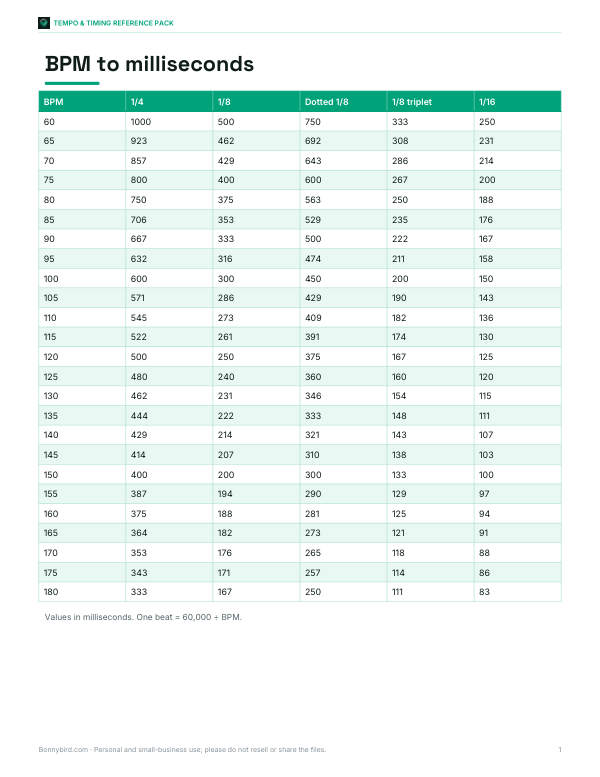
Printable BPM-to-milliseconds delay chart for 60–180 BPM, a genre tempo chart, a setlist tempo planner and a practice tempo log.
- BPM delay chart (PDF, XLSX)
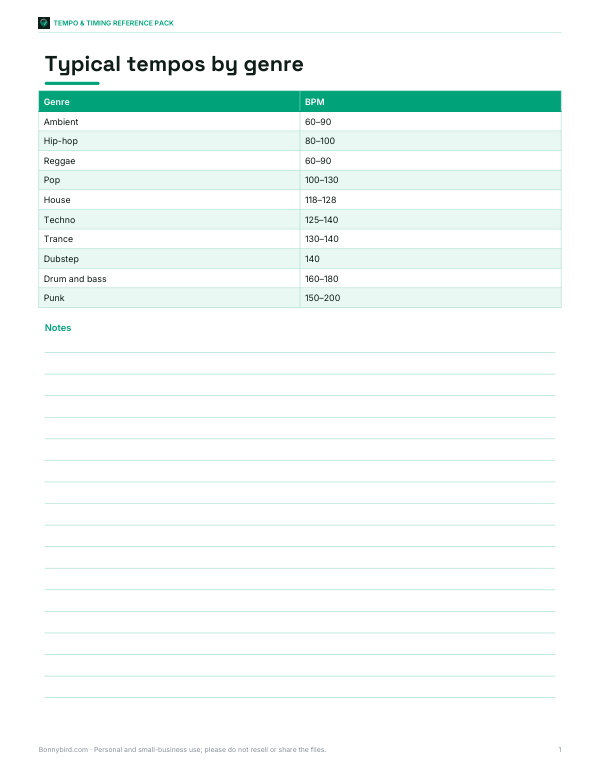
- Genre tempo chart (PDF)
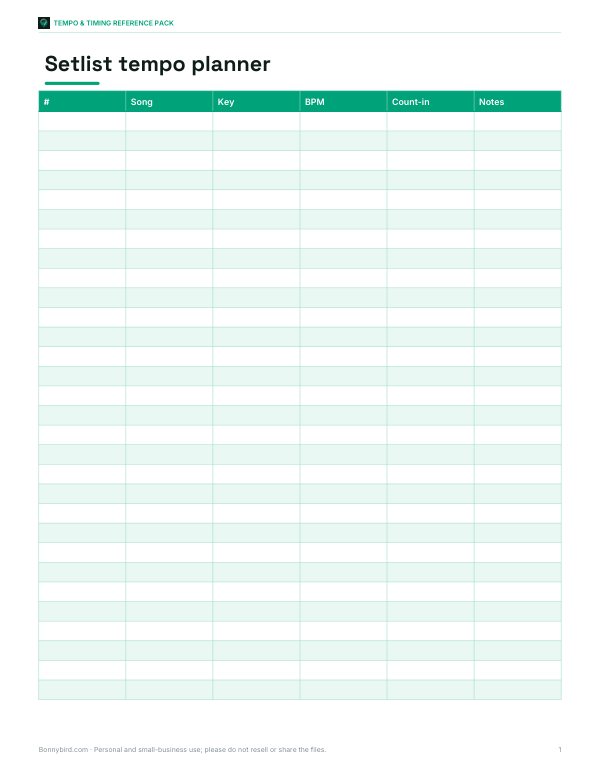
- Setlist planner (XLSX)
- Practice tempo log (PDF, DOCX, XLSX)
Formats: PDF, XLSX, DOCX. Instant download after payment (link valid 72 hours, up to 5 downloads). AI-assisted: the templates were drafted with AI help and reviewed and laid out before publishing.
$5.00 USD, one-time 4 files · about $1.25 each
- Instant download
- 7-day refund
- Secure checkout by Stripe
7-day money-back guarantee. Full refund within 7 days of purchase, even after you download.
Free sample: BPM Delay Chart (PDF, 57 KB)
Full refund within 7 days — see the refund policy and license.
Free printables
Single sheets you can print right now, no sign-up. The full pack adds every sheet in one download plus the editable files.
 Printable Practice Tempo Log
What BPM means
BPM (beats per minute) is the tempo of a piece of music: how many beats — usually quarter notes — occur in one minute. A slow ballad might sit around 60–80 BPM, pop and hip-hop often around 90–110, house music around 120–128, and drum and bass around 170–175. Knowing a song’s BPM helps DJs mix tracks, producers sample and remix, musicians practise with a metronome, runners and dancers match music to pace, and video editors cut to the beat.
How to use tap tempo
- Play the song and listen for the steady pulse — the beat you would clap or tap your foot to.
- Tap the button (or press any key) on each beat.
- Keep tapping for 8–16 beats; the BPM settles as the average improves.
- If you stop for more than a couple of seconds, the counter starts again.
- Press Reset to measure another song.
The finder ignores the occasional mistimed tap by using the median interval and discarding outliers, so a slightly early or late tap will not throw off the result.
How file analysis works
When you load an audio file, your browser decodes it locally and the analyser measures how the energy of the sound changes over time. Drum hits and note attacks create sudden rises in energy (onsets). The analyser then looks for the repeating interval between onsets using autocorrelation — comparing the energy pattern with delayed copies of itself — across tempos from 60 to 200 BPM, with a slight preference for common tempos. Results can come out at half or double the tempo you perceive, especially for music with strong off-beats; compare with a quick tap test to confirm.
Typical tempos by genre
| Genre | Typical BPM |
|---|---|
| Ballads, ambient | 60–80 |
| Hip-hop | 80–100 |
| R&B, reggae | 60–100 |
| Pop | 100–130 |
| House | 118–128 |
| Techno | 125–140 |
| Trance | 130–140 |
| Dubstep | 140 (felt at 70) |
| Drum and bass | 160–180 |
| Punk, fast rock | 150–200 |
These are broad ranges; tempos vary widely within every genre.
BPM to milliseconds for delay and reverb
Producers often time delays, reverb pre-delay and modulation to the song’s tempo so effects sit in the groove. One beat lasts 60,000 ÷ BPM milliseconds: at 120 BPM a quarter note is 500 ms, an eighth note 250 ms, and a dotted eighth 375 ms — the classic rhythmic delay. Triplets are two-thirds of the straight value. The table above calculates straight, dotted and triplet values for common note lengths, plus the equivalent frequency in hertz for syncing an LFO.
Worked example
A guitarist wants a dotted-eighth delay for a song. Tapping along for 12 beats gives 104.8 BPM, and a file analysis of the recording estimates 104.9 BPM. At 105 BPM, a quarter note is 571.4 ms, so a dotted eighth is 571.4 × 0.5 × 1.5 = 428.6 ms. They set the delay pedal to about 429 ms, and the repeats fall neatly between the notes they play.
Using BPM for running and workouts
Many runners match music tempo to their cadence — steps per minute. A running cadence of 160–180 steps per minute pairs well with songs at 160–180 BPM, or 80–90 BPM tracks with one step on each beat and off-beat. Cyclists and gym classes use tempo in a similar way. Use the tap finder on your own playlist to build lists at the tempo you want.
Tips for accurate results
- Tap to the main pulse, not every hi-hat hit — if the result seems very fast, try tapping half as often.
- Use a section with steady drums; intros and breakdowns may be freer in time.
- Live recordings and older music may drift in tempo; the result is an average.
- Songs with swing or strong syncopation can confuse automatic analysis; trust your ears.
- For very long files, the analyser uses the first 60 seconds; trim the file to a steady section for the best estimate.
BPM and musical keys for DJs
DJs mix tracks whose tempos are close — usually within a few BPM — and adjust one with the pitch or tempo control to lock the beats together. Many also match musical keys so the harmonies blend. Tempo is the easier of the two to measure: tap along to both tracks, note the difference, and you know how far to move the tempo fader. A change of about 6% in tempo is usually the limit before a track sounds noticeably faster or slower, although key-lock features keep the pitch steady.
Tempo markings in classical music
| Marking | Meaning | Approximate BPM |
|---|---|---|
| Largo | Very slow, broad | 40–60 |
| Adagio | Slow | 66–76 |
| Andante | Walking pace | 76–108 |
| Moderato | Moderate | 108–120 |
| Allegro | Fast, bright | 120–156 |
| Presto | Very fast | 168–200 |
Classical tempo words describe character as much as speed, and performers interpret them differently; the BPM ranges are common metronome guides.
Privacy
Audio files are decoded and analysed entirely in your browser using the Web Audio API. They are not uploaded, stored or shared.
Frequently asked questions
How do I find the BPM of a song?
Tap along to the beat for 8–16 taps, or load the audio file for automatic analysis.
Why is the result double or half what I expected?
Both are valid readings of the pulse; many tracks can be felt at either. Choose the one that matches how you count the beat.
Is my audio file uploaded?
No, it is analysed locally in your browser.
What BPM is a quarter-note delay at 120 BPM?
500 milliseconds.
Which audio formats work?
Most browsers decode MP3, WAV, M4A/AAC and OGG.
How accurate is tap tempo?
With 12–16 steady taps, usually within about 1 BPM.